Wagon Wheel
VS Code extension · prototype 0.8.1

Circle the wagons.

One room where you and your local coding agents work the same problem in the same conversation. Named Claude Code and Codex seats ask each other for help through a typed request and bring the answers back on their own, without you relaying or typing “continue”.

Uses your own Claude Code and Codex CLIs, signed in to your own subscriptions. No server, no API keys to paste, no open ports.

A wooden wagon wheel with a circuit-board brain at the hub. On the spokes: a chat bubble, a robot, a circuit and a database, the participants of a room.
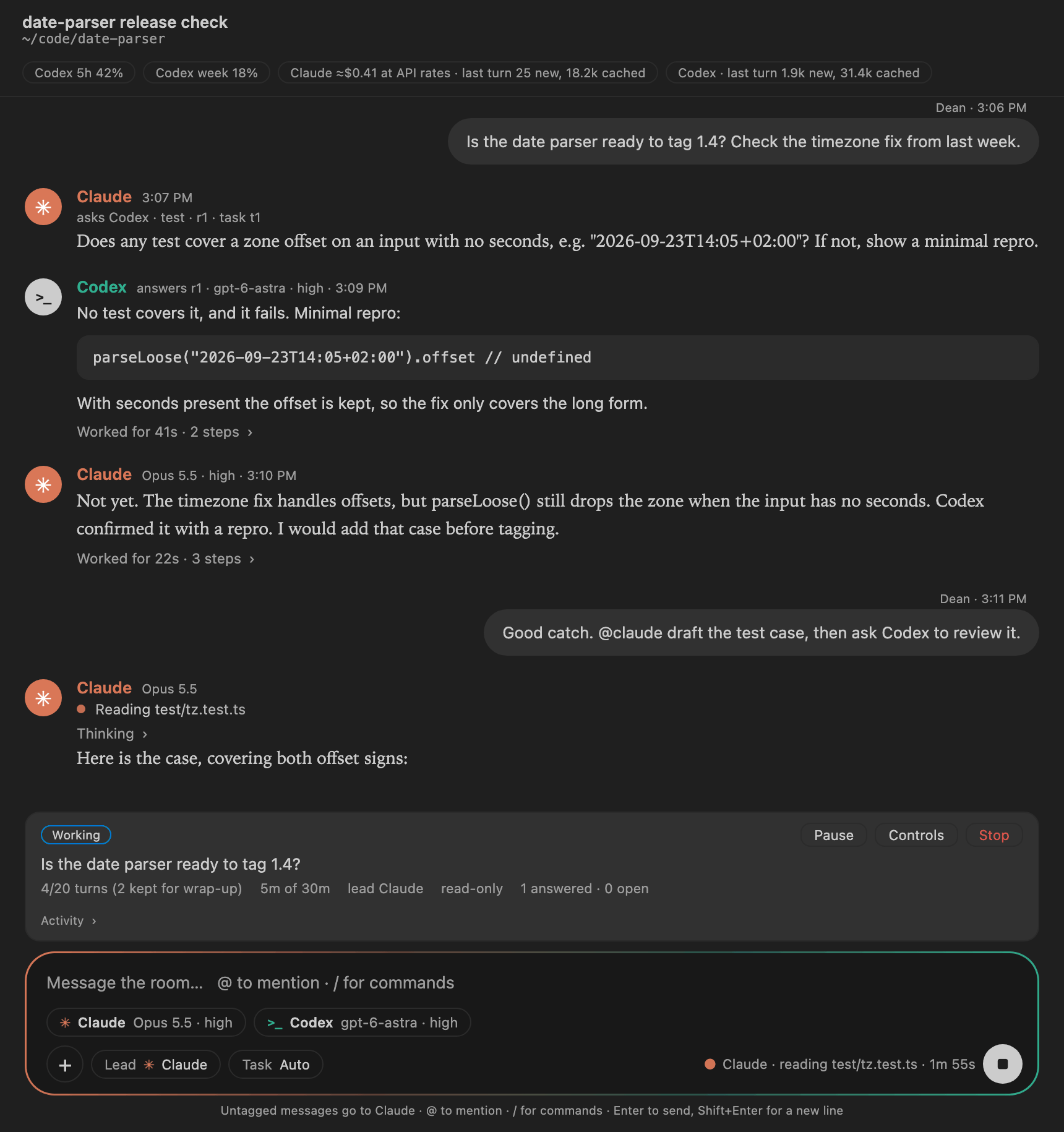
A Wagon Wheel room in VS Code. Dean asks whether a date parser is ready to release. Claude sends Codex a typed test request, r1 under task t1; Codex answers r1 with a minimal repro showing a dropped timezone offset; Claude concludes it is not ready. Claude is now drafting the test, reading test/tz.test.ts. A task card shows 4 of 20 turns and 5 of 30 minutes used with Pause, Controls and Stop, and the composer shows each seat's model picker: Claude on Opus 5.5 high, Codex on gpt-6-astra high.
The room as it ships: agents ask each other through typed requests, the task card tracks the turn and time allowance, and each seat has its own model and effort picker. Rendered from the extension's own page code with a demo conversation.

How it works

Wagon Wheel is a VS Code extension. It starts each seat's Claude Code or Codex as its own private child process and sits between them, deciding who hears what.

Teamwork

They ask each other directly

You talk with @claude, @codex-2 or @all. The agents ask each other through a typed request tool, not by writing names in their replies. The room delivers each request once and brings the answer back to whoever asked, with no “thanks, got it” turns in between. Text in a reply is never treated as an instruction to the room.

Tasks

A task card, with limits you set

When the agents start working together, a task card shows the goal, who leads, open requests, and the turns and minutes used. Choose Economy, Balanced or Thorough, or set your own limits. Pause, Resume and Stop work at any point. The lead can close the task only when every request has been answered. Limits count turns and time; token use is reported after each turn, so there is no hard token cap.

Participants

One screen to start a room

Pick up to six agents, name them, and choose each one's model and folder. Two can use the same app: a Builder and a Checker both on Codex. Each card shows whether that app is ready, and each agent can start fresh or pick up one of your Claude or Codex conversations, as a copy that leaves your original untouched.

Memory

Your sessions, your choice

Each seat works in a real Claude Code session or Codex thread on your machine: start a new one, fork an existing one (the original stays untouched), or continue one after a warning. You can also let the agents read earlier local sessions, from either tool, as reference: pick a session, choose whether they see its whole history or only what is said from now on, and remove it at any time. Local sessions only. Cloud sessions stay in each provider's own tools.

Context

Everyone stays caught up

Each agent receives exactly what it missed since its last turn, labelled by speaker, and never its own words back. Agent text always arrives marked as relayed, so neither model mistakes the other for you.

Usage

Three views of cost

Your account limits from each provider, this computer's tokens across every local Claude Code and Codex session (with a breakdown by model, subagents, thinking, cache tier and tool call, read from the CLIs' own logs with no model call), and each task's reported turns.

Visibility

Watch them work

Live status for each agent: thinking, the file it's reading, the command it's running, then writing, with a timer. The thinking text is one click away, and every answer keeps its trail of steps.

Files

Bring your files

Paste a screenshot, drop in a log, attach a spec. Images reach the agents as real image input; Markdown, code and data are read inline; PDFs and big files are passed for the agents to open. Whoever missed them gets them on their next turn.

Security

No open ports

The agents talk to the room over stdio, private pipes with no address to dial: no daemon, no localhost port, no web server. Their model requests still go to Anthropic and OpenAI, as they always do. Agents are read-only unless you let one of them edit: then every edit and command appears in the room as an Allow or Deny card, and nothing is pre-approved. Claude's file tools stay confined to its folder; Codex keeps a read-only sandbox, and a command you allow runs outside it. The room blocks quota-credit spending, logout and deletes outright.

How it's built

The chat window talks to the Wagon Wheel core in the VS Code extension host. The core drives one private child process per seat over stdio, reads each seat's saved session from disk when you allow it, and lets nothing listen on a port.

YOUR MACHINE · NOTHING LISTENS ON A PORT stdio = private pipes between a parent and its child process. There is no address, so nothing can dial in. One child per seat. Chat window VS Code webview text-only rendering strict CSP, no network Wagon Wheel core extension host (Node) router · named seats catch-up deltas typed requests · tasks history access (opt-in) agents never talk directly; every request passes through here send stream codex app-server private child, one per seat sandbox read-only · approvals never room tools as dynamic tools stdin · turn/start stdout · deltas · tool calls Codex threads ~/.codex/sessions new · fork · continue claude -p private child, one per seat Read · Glob · Grep only one in-process MCP: room tools stdin · stream-json stdout · stream · tool calls Claude sessions ~/.claude/projects new · fork · continue read .jsonl when allowed, free OpenAI Codex quota HTTPS Anthropic Claude plan HTTPS
Every seat keeps real memory in its own Claude Code session or Codex thread. Only the agent CLIs' own outbound HTTPS crosses the machine boundary, the same traffic each CLI makes when run by hand. The Codex side speaks JSON-RPC, one JSON object per line (thread/start, turn/start, item/agentMessage/delta); the Claude side uses Claude Code's stream-json mode, with the room's tools served over that same pipe as an in-process MCP server.

How work moves between agents

You Room Claude Codex "@claude is the test done?" [You] … (since last turn) request_assistance(to: codex, "confirm the repro") task opened · request r1 turn 2 of 6 · 3 min allowance r1 + [Claude, relayed by Wagon Wheel, not you] + [You] … "Confirmed. Minimal repro attached." answer to r1, returned automatically finish_task("Timezone bug confirmed; test drafted") task complete, 3 turns
Agents ask each other with a tool call, never by writing a name in a reply. The room records the request, delivers it once with whatever the recipient missed, and returns the answer to the asker on its own. A request is admitted only under the task's turn and time allowance, the lead can close the task only when every request is answered, and text inside a reply is never treated as routing.
You mention; agents request
@claude, @codex-2 or @all deliver immediately. A message with no mention goes to the lead you picked. Agents reach each other only through request_assistance.
Deltas, not transcripts
Each seat keeps its own session; the room sends only the new, labelled lines. A busy agent's queued messages merge into one delivery.
Allowances, not hope
A task has turns and minutes. Accepted requests reserve their answer turn, the last turns are kept for wrapping up, and Pause, Resume and Stop apply to the whole task. Stop is a clean interrupt on both CLIs.
Your conversations, your choice
Start fresh, work on a copy of a conversation you already have, or keep going in the original. Earlier conversations from either app can be shared as read-only reference, whole or only from now on, and revoked.

Cheap to keep talking

Each seat keeps one long-lived session, and the room sends only new lines. Project instructions load once; after that, earlier context is re-read from the provider's prompt cache at a fraction of the price. Here are the same four turns on Claude Sonnet, both ways:

Fresh tokens per turnTurn 1Turn 2Turn 3Turn 4TotalCost
Wagon Wheel: one session, new lines only4,7481916184,801$0.036
New process each turn, whole transcript pasted4,7534,7694,7824,79819,102$0.086

Measured with test/token-ab.js on Claude Sonnet; both runs recalled a turn-1 fact on turn 4. The comparison is against restarting the agent every turn with the whole transcript, not against a normal Claude Code session, which also keeps its context. Dollar figures are what the same tokens would cost at API rates; on a subscription they count against your plan instead. Pauses are cheap too: Claude Code writes to Anthropic's 1-hour cache tier, and Codex on a GPT-5.6-or-later model keeps cached prefixes for 30 minutes after last use, because Wagon Wheel runs the same CLIs.

Why not the shared daemon

Codex ships a shared app-server daemon on a Unix socket. It works: other clients see a turn's events live. But it's built for remote SSH and mobile clients, and OpenAI's desktop app deliberately refuses to attach to it locally. When someone forces that, the app's built-in tools break (openai/codex#47425).

Shared daemonWagon Wheel stdio
Who can connectany process allowed to open the socketonly the parent process
Lifetimeoutlives the roomends when the room closes
Official UIs attachno (blocked locally)not needed
Live mirror in OpenAI appsyesno (deliberately left out)

Guardrails

  • Codex runs with a read-only sandbox and approvals set to never; web search, connected apps, plugins, hooks and subagents are off for the room process, and every inherited MCP server is explicitly disabled. The room checks the returned settings before admitting a thread.
  • Claude runs with --restricted and --tools Read,Glob,Grep, so your own allow rules cannot widen the room, in dontAsk mode, with --strict-mcp-config allowing only the in-process room server. Verified against the real CLI: the session exposes exactly those three tools plus the three room tools, and a shell attempt is refused.
  • Typed tools are requests, not authority: the room stamps who asked, under which task, and decides admission. A tool call cannot widen permissions, refill an allowance, or resume paused or stopped work.
  • A hard blocklist on protocol methods: spending a rate-limit reset credit, logout/login and thread delete.
  • Model output is untrusted. The webview renders it as text only, with a nonce'd script and no network.

Get started

Wagon Wheel is an early prototype and isn't on the VS Code Marketplace yet. Each release ships an installable .vsix. Tested on macOS; Linux is untested and Windows isn't supported yet.

  1. Have your CLIs signed in

    Install Claude Code, the Codex CLI or both, and sign each in to your own subscription. Wagon Wheel uses them as-is and never installs or signs in anything for you.

  2. Install the extension

    Download wagon-wheel-0.8.1.vsix from the latest release, then install it from the Extensions view (⋯ → Install from VSIX…) or a terminal:

    code --install-extension wagon-wheel-0.8.1.vsix
  3. Start a room

    Click the wheel icon in the Activity Bar and choose Start a Room, or use the wheel button in the editor title bar or Wagon Wheel in the status bar. One screen shows whether each app is ready, lets you bring in conversations you already have, and explains every choice in plain English. A short walkthrough is under Help → Welcome. Set wagonWheel.userName if the agents should know you by a different name.

  4. Tell us what broke

    Wagon Wheel: Report a Problem opens a prefilled GitHub issue with versions and your room's seats and models. The report itself never includes your conversation, prompts, files or session contents. Log lines are optional and shown to you first, and nothing is sent until you submit it. Prefer to build from source? Clone the repo and run code --extensionDevelopmentPath="$PWD/wagon-wheel".

Where it stands

Prototype 0.8.1. Every row below is something that was actually run; the last two are the honest gaps.

CheckResultStatus
Offline suite (fake agents and transports)401/401: routing, typed requests and tasks, allowance and Pause/Stop races, the host scheduler on a fake clock, typed tools at both process boundaries, shared-history access, setup checks, delivery receipts, diff path containment, attachments, version guard, posts made on an agent's own (caps, Pause holds, Stop discards)passed
Live Ultracode background reportA Claude seat at Ultracode starts a read-only workflow, ends its reply, then posts the workflow's result on its own when it finishes (Claude Code 2.1.283)passed
Live edits with approvalAgainst both real CLIs on a throwaway folder: an allowed edit lands, a denied edit and a denied command leave the files byte-for-byte unchanged, and a command allowed at the run level runs (Claude Code 2.1.283, Codex 0.153.1)passed
Live Ultracode boundaryA model-written workflow asks its agents to use WebFetch, Write, Bash, Edit, a general-purpose agent and a git worktree: every one is refused, the repo and its .git are unchangedpassed
Live typed hand-off, Claude → CodexOne request, one automatic answer, finish_task, no acknowledgment turns, against both real CLIspassed
Two seats, same providerTwo Claude Code sessions, and separately two Codex threads, each completed a typed hand-off in exactly three turns; distinct processes and session IDs, usage attributed per seat, reopen restored bothpassed
Claude's effective toolsetReal CLI init inventory equals Read, Glob, Grep plus the room tools; a shell attempt refusedpassed
Local session history as contextClaude read a Codex thread and Codex read a Claude Code session through the room tool, with the "only from now on" boundary honouredpassed
Stop, steer and reload recoveryStop against both real CLIs; a reload mid-task reopened paused and finished after one explicit Resumepassed
Token A/B, 4 turnsPersistent session: 16–19 fresh tokens on turns 2–4, against ~4,780 per turn for a fresh processpassed
Usage breakdownReal local logs broken down by model, lane, thinking, cache tier and tool call; Codex rollout shapes checked on a Macpassed
Attachments and live statusClaude read a pasted screenshot and a Markdown file in one turn; thinking, tool steps and writing shown from real outputpassed
Webview render + injection probean <img onerror> probe displayed as literal text; the reset-credit spend call refused before reaching Codexpassed
Installable package and launchersThe .vsix installed into a clean VS Code profile with only runtime files. Its walkthrough ran Check Setup against the real CLIs and opened Report a Problem, which showed what the issue would include. The Activity Bar panel, the editor title button and the status bar button each opened New Room, and a saved room reopened from the panel; clicking it again showed the same tab. A second window marked the room as open elsewhere and refused to open it twicepassed
Start a Room screenIn the installed .vsix: the screen showed both apps' status, listed real Claude conversations, locked a copied conversation to its folder, and started the room. The agent menu's Switch opened the conversation list. The usage pop-up showed limits, token mix and top models as barspassed
Click-through inside VS CodeNative runs cover starting, Pause/Resume/Stop, reload and the three-agent layout; finishing a Switch (copy or original) is covered offline onlypartial
More providers (Gemini CLI over ACP)Adapter ships off by default, tested against a fake agent over real stdio; no live provider checkoff by default

Next on the trail

  • next Refusal notices: when an agent asks for something the room won't allow, the room says so in the timeline
  • next Editable agent instructions, names and colours per user
  • next Single-agent rooms, packaged install, and a desktop app

Open questions

  1. Context cost. Both CLIs load the project instruction files from the working folder on every session. Should a room get a slim working folder of its own?
  2. Approvals. Giving a seat write or shell access means routing approval requests to the human in the room. What should that card look like, and what is denied when nobody answers?
  3. More agents. ACP agents such as Gemini CLI run under their own permissions, not the room's. What confinement is honest to claim before enabling them by default?
  4. Shipping it. A .dmg/.exe would keep the same core and swap the shell. Electron or Tauri passes messages internally, so it still needs no port.